.png&w=640&q=75)
Our Products
Enterprise software we build ourselves — and run in production every day.
Platforms featured
Expert consultants*
Clients recommend us
Delivery locations
Three products, one engineering team
Pick the problem you are trying to solve
Each product stands on its own, and each one came out of a real gap in how we deliver — so what you see is what we depend on.
Product 01 · Workforce & effort
TimeSheet Tracker
Every hour accounted for, without the spreadsheet.
TimeSheet Tracker is the web application we use across VIPAS to record working hours, plan daily work and track progress against assigned projects and tasks. Log time after the fact or run a live timer while you work — then pull a report your project manager can act on.
- Three views of the same hours — calendar, list and graph, switchable in one click.
- Record Activity timer — start it when you begin, stop when you finish, the time logs itself.
- Reports you can shape — eleven columns, filters, sorting and one-click export.
- Approval built in — managers review and approve hours, so month-end is not a reconstruction exercise.
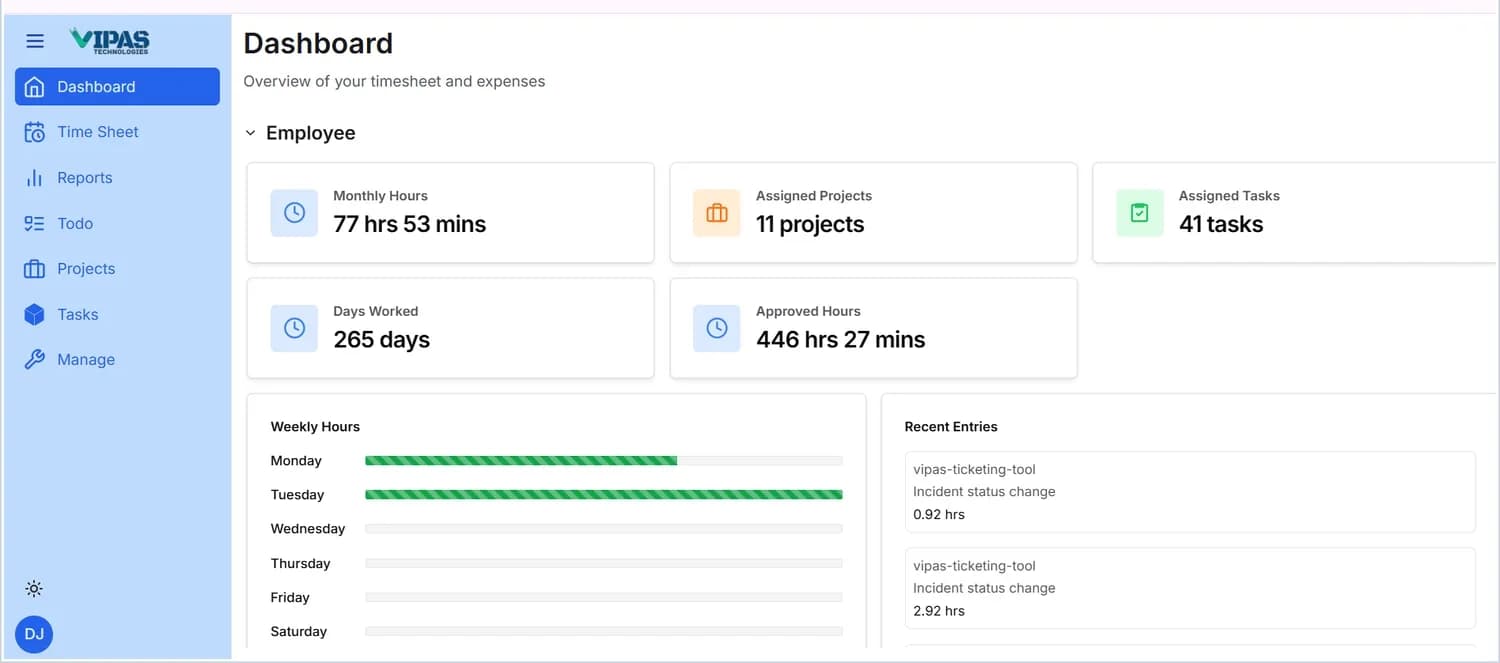
What the dashboard tells you
Five cards across the top, refreshed as you log.
Three ways to see the same hours
The Month / Week / Day selector controls the period; the arrows step through it.
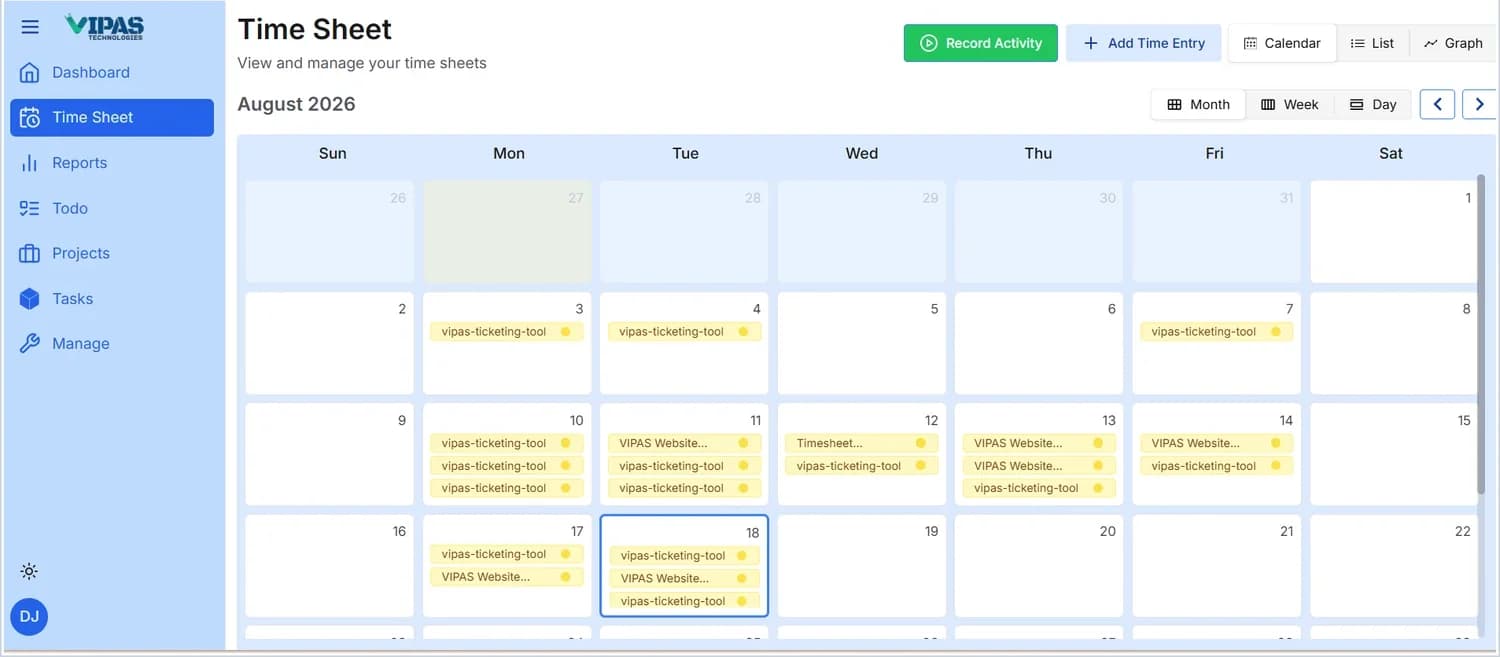
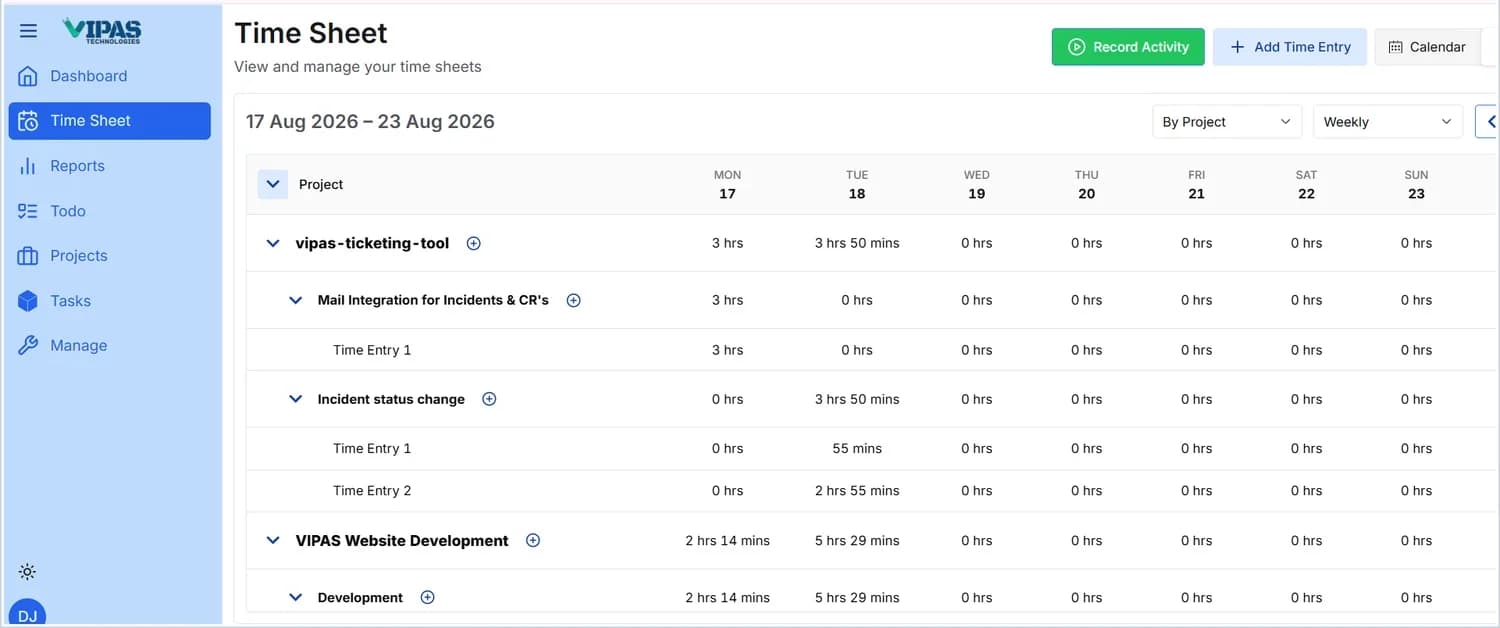
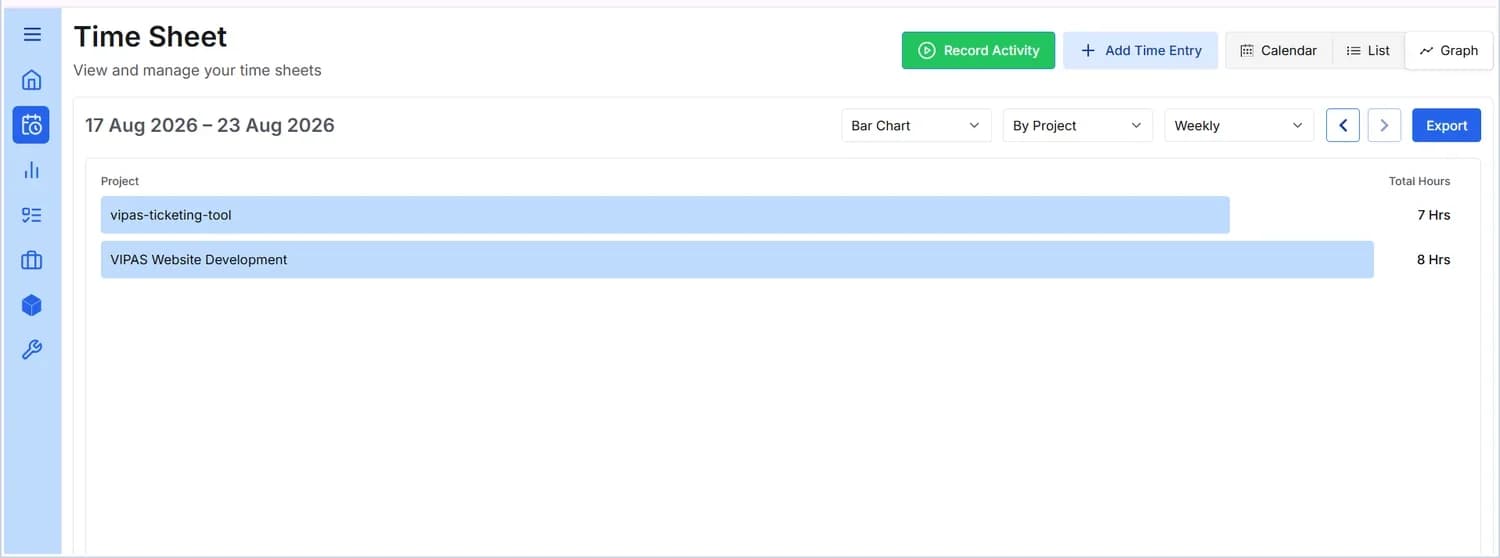
Inside the application
Seven areas, one sidebar
Time Sheet
Add a time entry against a project and task with a date, hours and description — or hit Record Activity and let the timer do it. Entries appear instantly in all three views.
Reports
A detailed summary across employees, projects and tasks. Choose from Employee, Project, Task, Task Type, Domain, Status, Manager, Allocated Hours, Logged Hours, Start Date and End Date — then filter, sort and export.
Todo
A personal planning board organised into buckets. Set a title, description, priority and due date; tick a card to complete it, or reopen it with a click.
Projects
Every project you are assigned to, with its status, type, member count and manager. Sort, filter and open any project for full details.
Tasks
The individual pieces of work behind each project, in a List table or a Kanban board grouped by status. Add one task or bulk-create many.
Manage & Profile
Your personal details and addresses, profile photo, notifications and self-service password change.
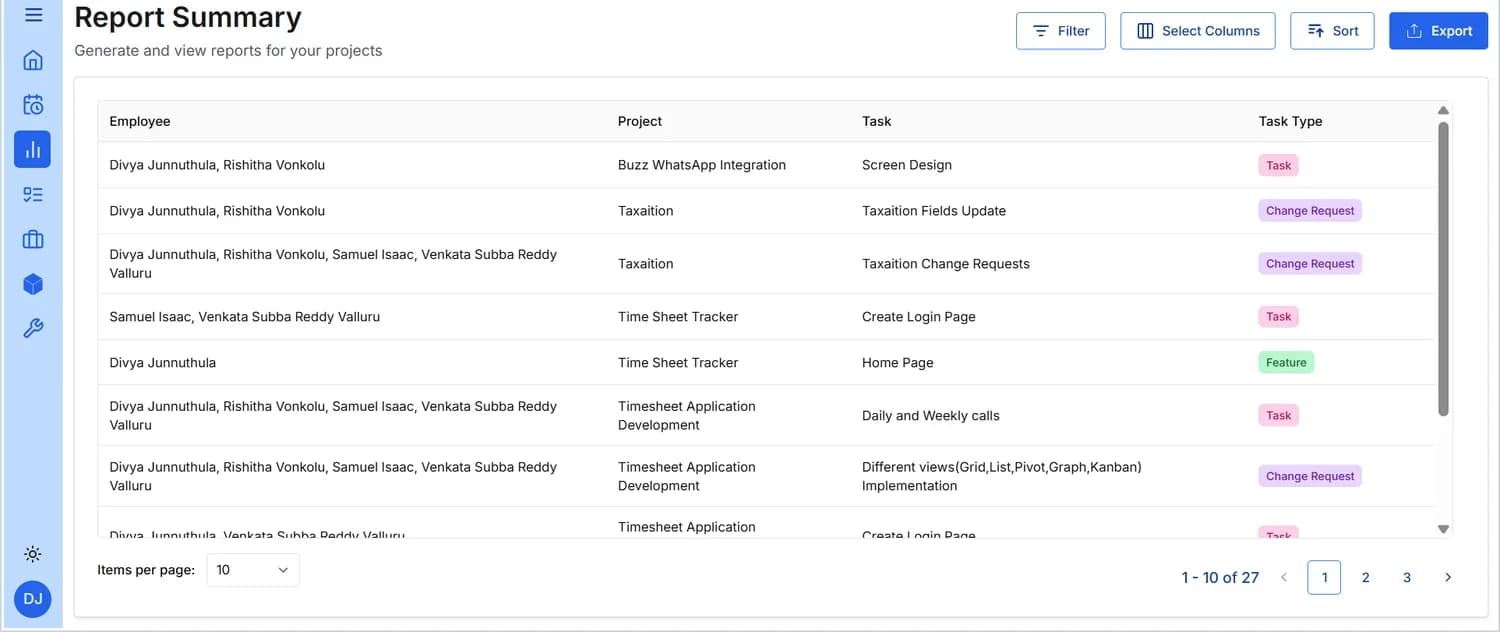
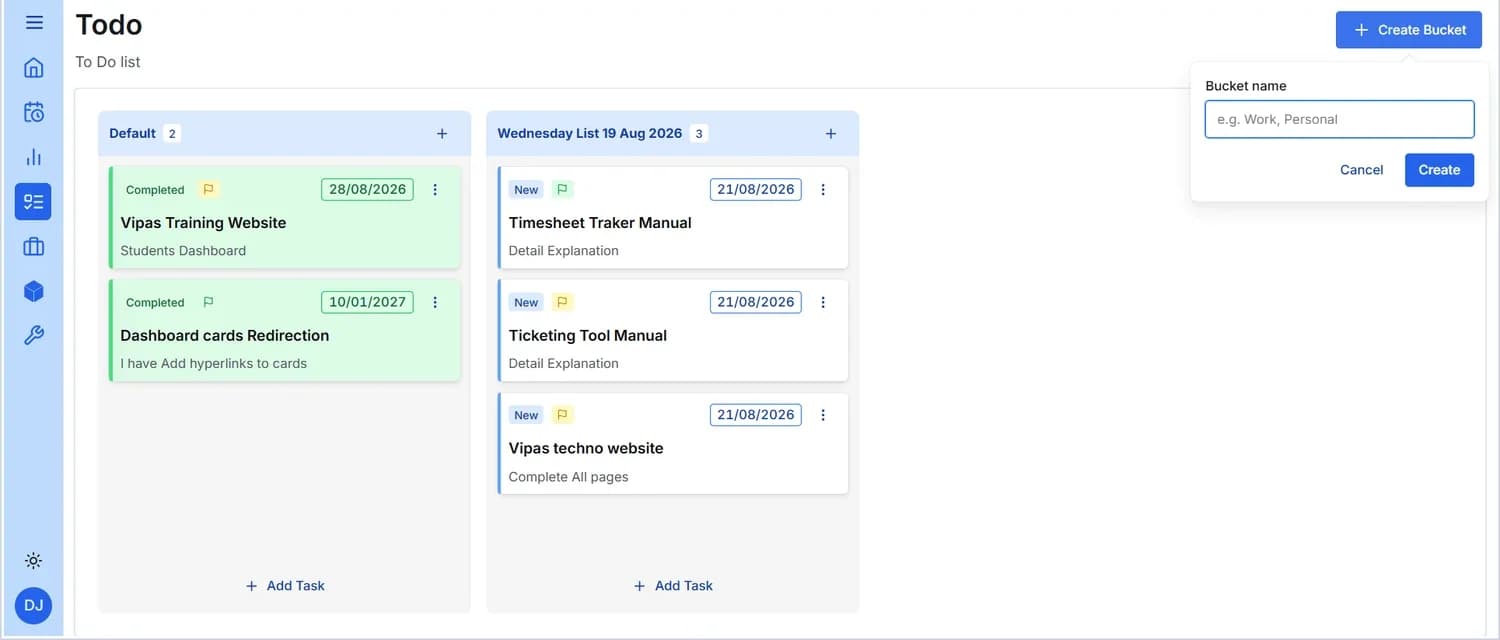
Roles matter. The screens above are the Employee role. Managers and administrators have additional screens, including review and approval of logged hours — walk through those on a demo.
Product 02 · ITSM & application management
Vtick
Raise · Track · Resolve
Vtick is the ticketing and application-management platform we run our own AMS engagements on. Incidents, problems, known errors, change requests, approvals, effort and SLAs — one system, one audit trail, and a separate walled workspace for every customer.
- Full ITIL-shaped lifecycle — incident, problem, known error, change and release, not just a ticket queue.
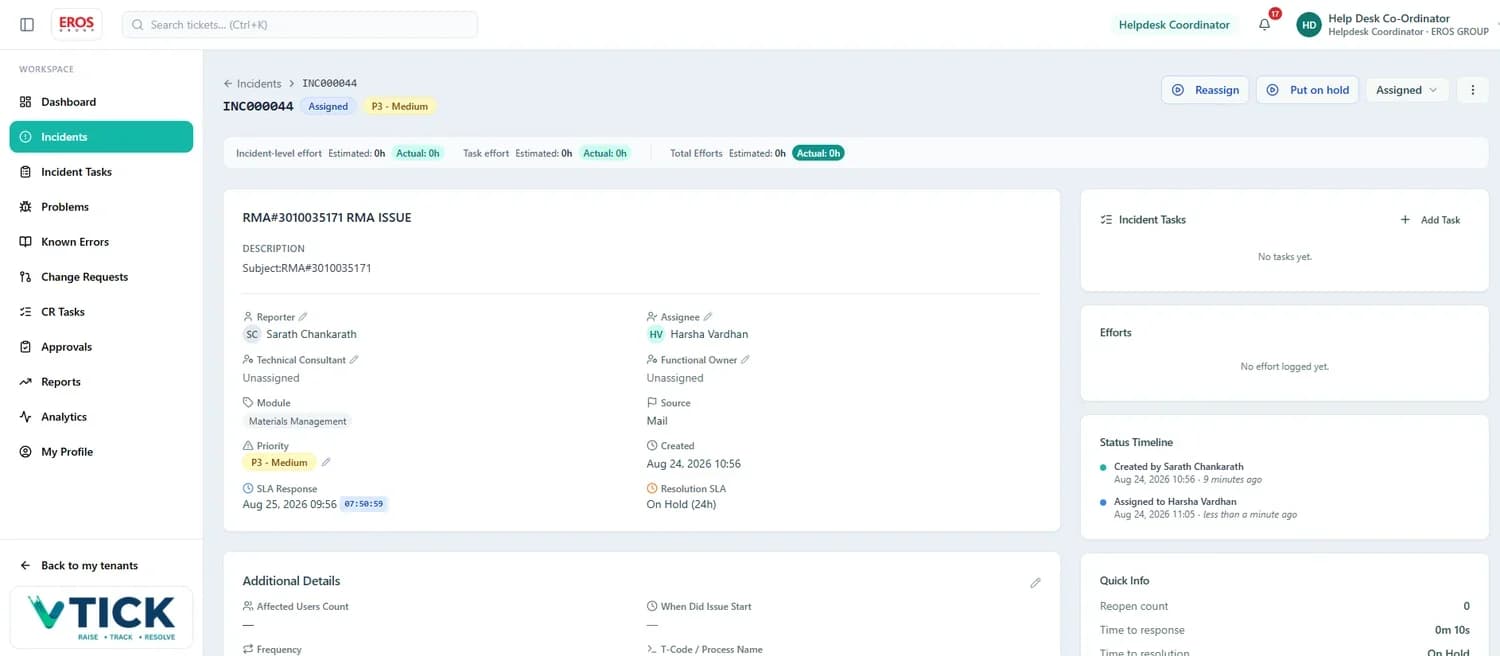
- Two SLA clocks that behave properly — response, then resolution, and the resolution clock holds while you wait on the client.
- Effort at incident and task level — estimated against actual, rolled up and reportable.
- Multi-tenant by design — data is never shared between projects, and roles are set per project.
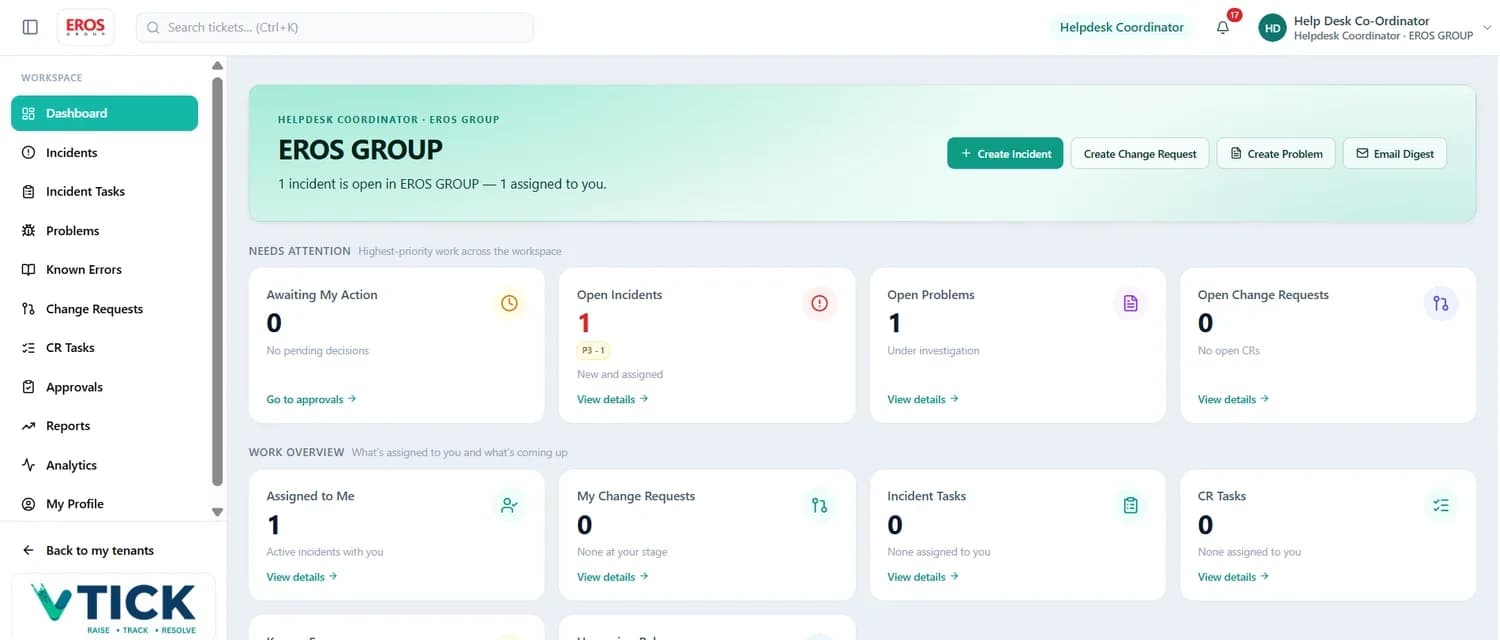
What you can do in Vtick
One sidebar, the whole service lifecycle
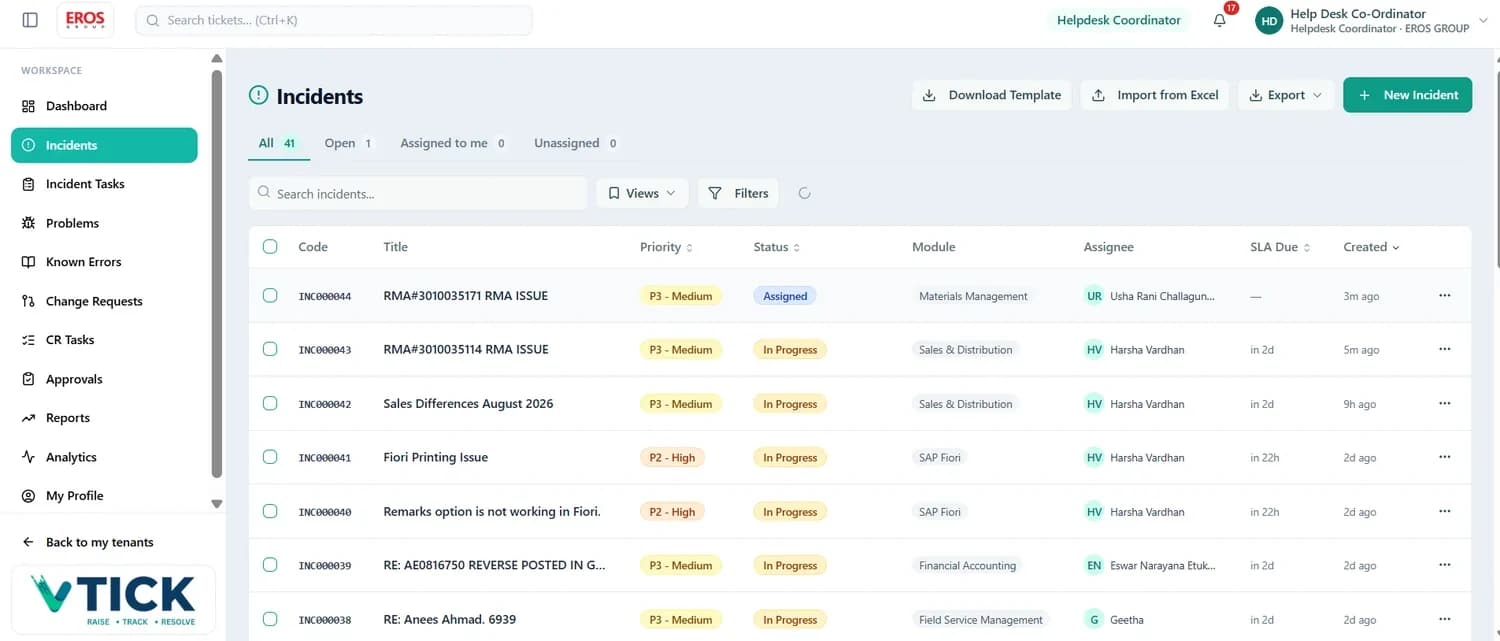
Incidents
Something is broken or not behaving as expected. Raise it, assign it, work it, resolve it — with a code such as INC000044 to quote in every conversation.
Incident Tasks
Sub-tasks that break one incident into pieces of work for different people — each with its own status, assignee and effort.
Problems
The underlying cause behind one or more incidents, investigated separately. Analytics tracks how often the same issue comes back.
Known Errors
Documented issues with a published workaround, so the same problem is never investigated from scratch twice. Search here before raising anything.
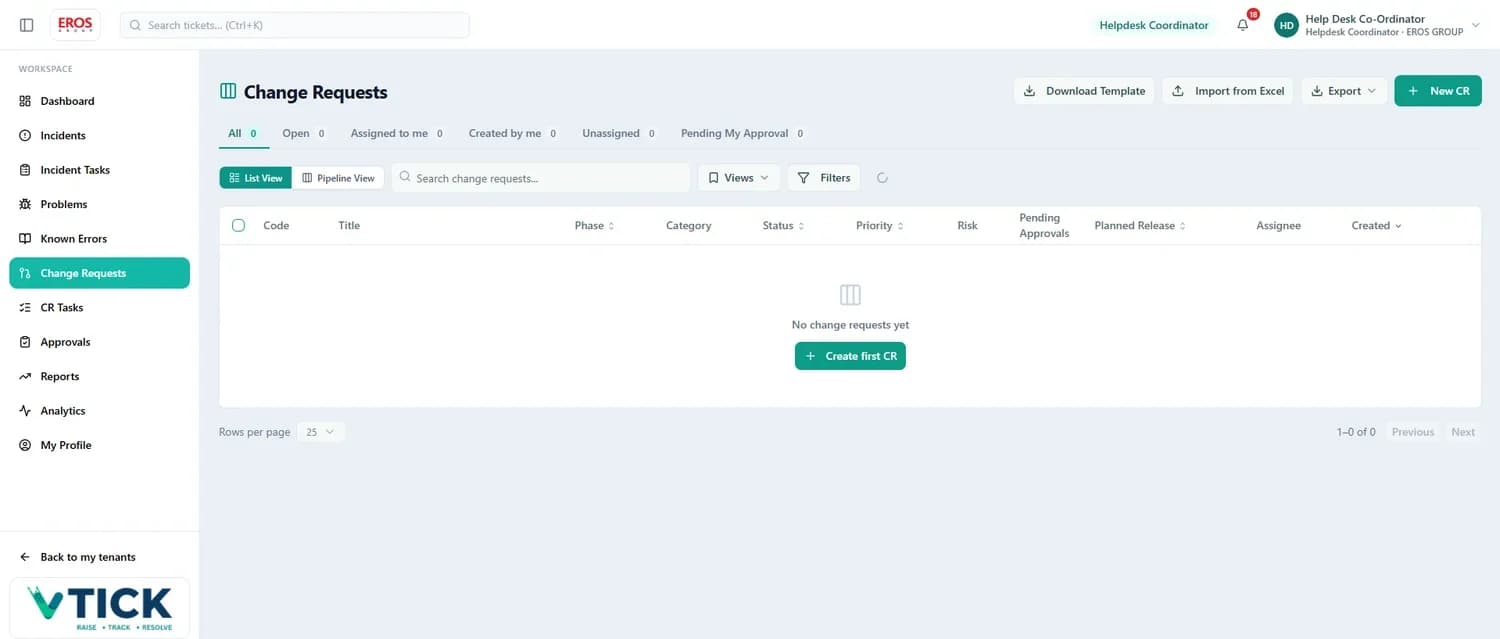
Change Requests
Planned changes — new development, enhancement, configuration — carrying a phase, a category, a risk rating, an approval trail and a planned release.
CR Tasks
Sub-tasks that break a change request into deliverable pieces, visible across every CR in one list.
Approvals
Your decision queue: approval gates, workflow steps at your stage and planned release date changes. Refreshes itself every minute.
Reports
Build, filter and export a table of incidents or change requests. A long, reorderable column list including Resolve SLA and estimated and actual hours per employee.
Analytics
Live operational dashboards plus historical trend and performance charts — SLA compliance, MTTR, change success rate, problem recurrence.
The bit most tools get wrong
Two SLA clocks, and the resolution clock pauses honestly
Understanding when a clock starts, holds and stops is the difference between an SLA figure you can defend and one you cannot.
| Clock | Starts | Pauses | Stops |
|---|---|---|---|
| Response | Employee assigned to the ticket | — | Assignee sets status to In Progress |
| Resolution | When the Response SLA stops | Waiting for Validation, pending on client or user, On Hold | Issue resolved |
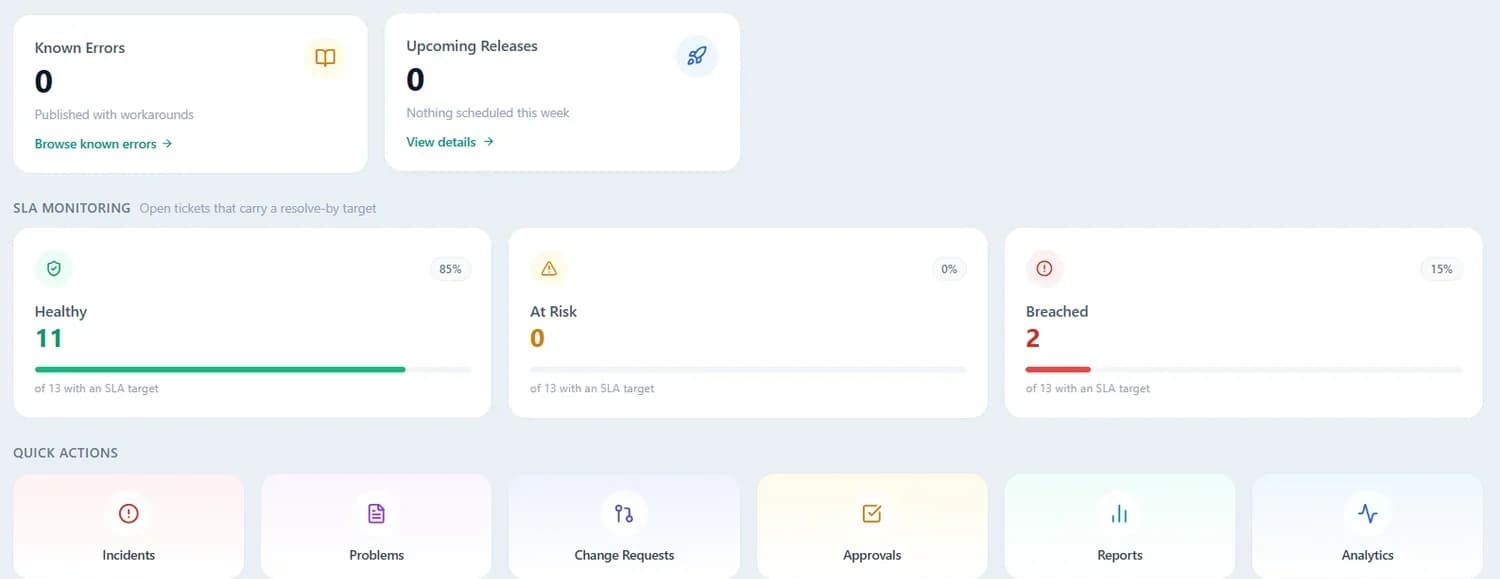
Healthy
Comfortably inside the SLA target. Nothing to do — keep working normally.
At Risk
Approaching the target and likely to breach. Prioritise these today, or put the ticket on hold if you are genuinely waiting on someone else.
Breached
The target has already passed. Escalate, comment to explain the delay, and close it out as soon as possible.
The incident lifecycle
| Status | Effect on SLA |
|---|---|
| New Logged, not yet assigned | Response clock running |
| Assigned Owner set, work not started | Response clock running |
| In Progress The assignee has started | Response stops; Resolution runs |
| Waiting for Validation Client asked to confirm the fix | Resolution holds |
| On Hold Genuinely blocked | Resolution holds |
| Resolved / Closed / Cancelled | Clocks stopped |
Priorities drive the target
| Priority | Use it when |
|---|---|
| P1 · Critical | Business is stopped. No workaround exists and many users or a critical process are affected. |
| P2 · High | A major function is unusable or badly degraded, or a deadline is at risk. A workaround may exist but is painful. |
| P3 · Medium | The default. Normal day-to-day issues with a reasonable workaround and limited impact. |
| P4 · Low | Minor issues, cosmetic problems, questions and requests for information. |
The priority list and the SLA target attached to each one are configured per project, so your contract's targets are the ones the clocks use.
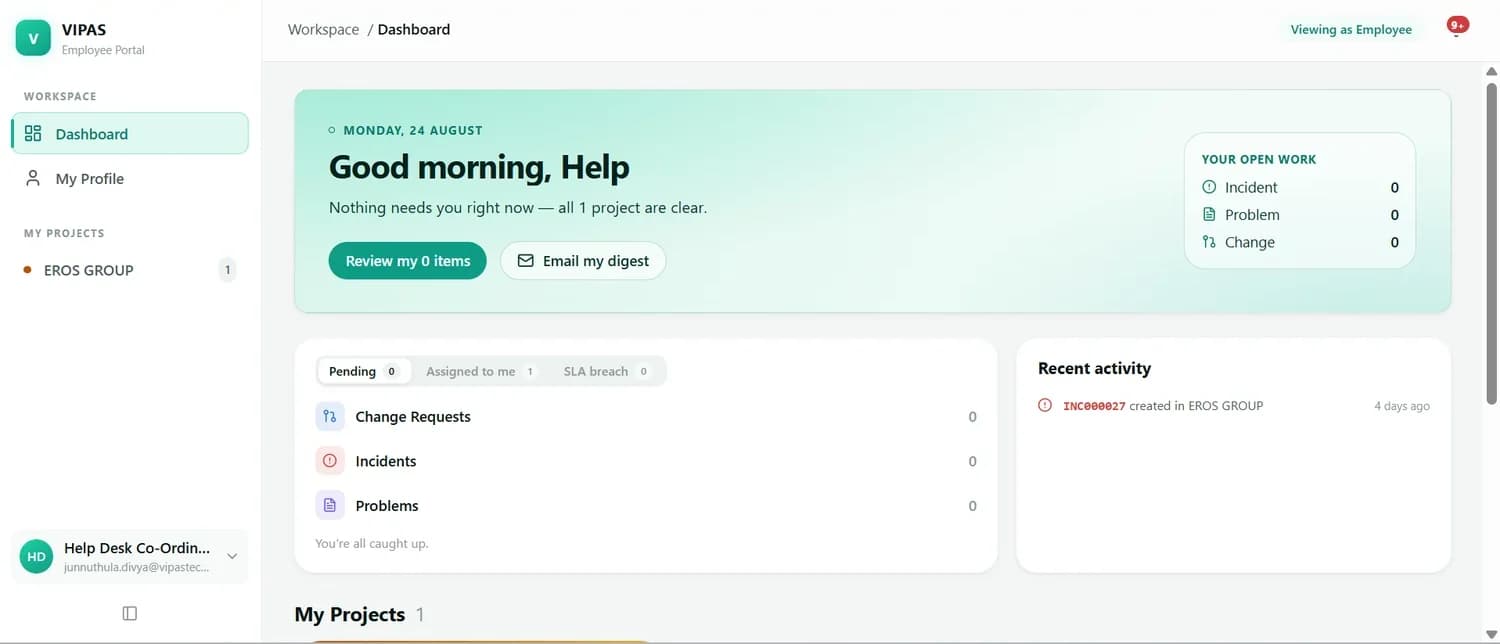
Inside the workspace
From the queue to the audit trail
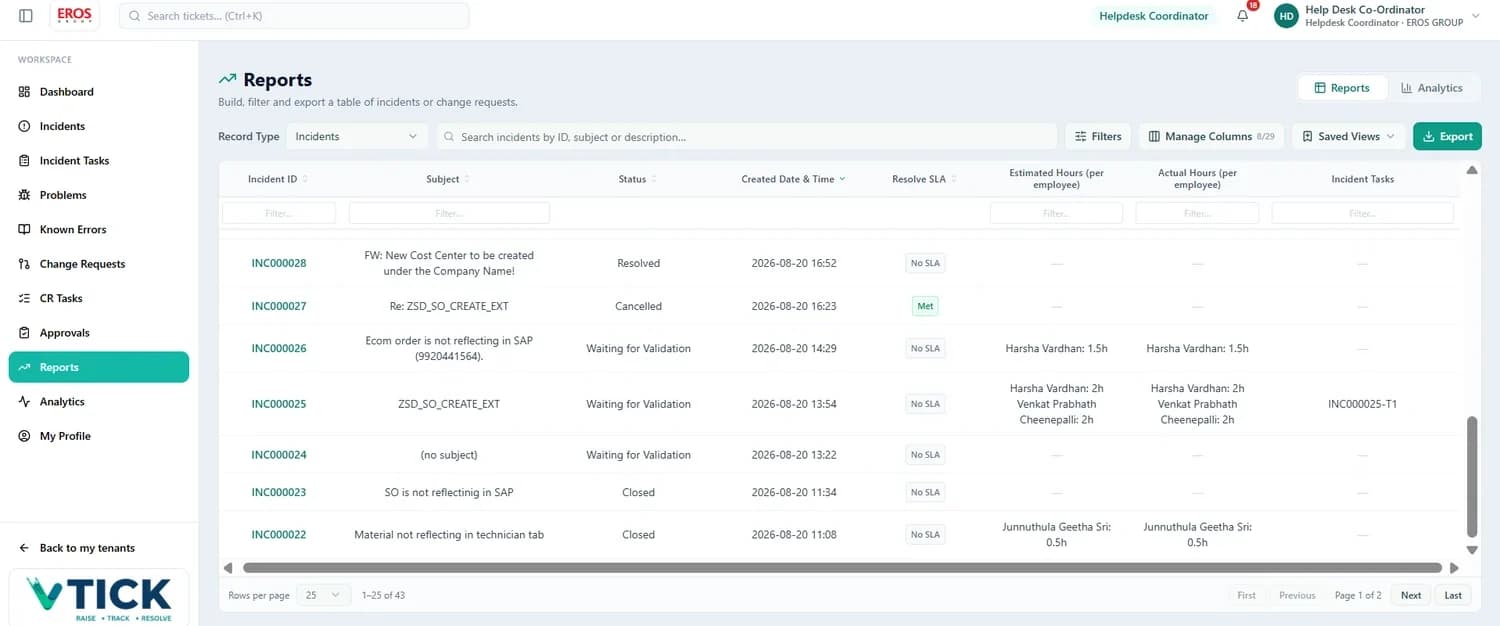

Roles and who does what
Set per project, so the same person can wear different hats
| Role | Typically responsible for |
|---|---|
| Reporter | Raised the ticket. Provides detail, answers questions and confirms the fix. |
| Assignee | Owns the ticket and is accountable for moving it through to resolution. |
| Functional Consultant | Understands the business process. Analyses the functional side and validates the solution. |
| Technical Consultant | Handles development, debugging and technical configuration. |
| Functional Owner | Accountable for a module or process area across tickets. |
| Helpdesk Coordinator | Triages incoming tickets, assigns owners, keeps the Unassigned tab empty and watches SLAs. |
| IT Approver | Approves change requests at the appropriate gate. |
| Observer | Follows a ticket and receives its notifications without owning it. |
Comments, not inboxes
The whole conversation stays on the ticket, so the next person can pick it up cold.
Attachments up to 100 MB
Screenshots, log extracts and specifications live with the ticket, not in an email chain.
Email inside the ticket
Reply and forward from the Mail tab; inbound replies re-attach themselves using the code in the subject.
Complete audit trail
Every update, reassignment and reclassification stamped with the person and the time.
Product 03 · AI-native tax filing
TaxAItion
Where intelligence files your return.
Upload your Form 16. We'll file the rest. TaxAItion reads your Form 16, AIS and 26AS, auto-fills the return, runs 62+ CBDT compliance checks, compares the old and new tax regimes side by side and puts a chartered accountant in front of it before anything is filed — typically in under five minutes.
- All ITR types — ITR-1 and ITR-4 self-serve, ITR-2 and ITR-3 handled with a CA.
- Government-ready JSON — output matches the ITR specification, so it uploads without manual edits.
- Human in the loop — real-time CA review and reconciliation inside the app, not a separate email thread.
- 256-bit AES encryption — at rest and in transit, and no third-party data sharing.
Interface illustration — replace with a live screenshot of taxaition.com before publishing.
How it works
Five steps from PDF to filed return
Create a free account
Sign in and start with 250 credits on signup — no card needed to see your numbers.
Upload your documents
Form 16, AIS or 26AS. The platform reads them and extracts what it needs.
AI auto-fills the ITR
Fields are populated from the source documents, then validated against 62+ CBDT checks.
Compare both regimes
Old against new, side by side, with the saving stated — so the choice is obvious.
Download JSON, or let a CA e-file
Take the government-ready JSON yourself, or have a chartered accountant review and file it.
Pricing
Priced by return type and income band
Total income up to ₹5,00,000
- Form 16 / AIS / 26AS parsing
- Regime comparison
- 62+ CBDT checks
- CA review before filing
₹1,750 for ₹5,00,001–₹12,00,000 · ₹2,995 for ₹12,00,001–₹50,00,000
Businesses taxed under presumptive schemes
- Presumptive computation
- Government-ready JSON
- CA review and e-filing
Capital gains, multiple income sources, professionals
- Scoped by a chartered accountant
- Full reconciliation support
- End-to-end filing
Prices as published on taxaition.com. Confirm current pricing before this page goes live.
Who it's for
First-time filers
Your first salary, your first return. Upload the Form 16 and follow the five steps.
Salaried individuals
Straightforward ITR-1 filings, with the regime choice worked out for you.
Presumptive businesses
ITR-4 filers who want the computation and the JSON handled properly.
Capital gains & multiple incomes
Professionals with ITR-2 or ITR-3 complexity, scoped and filed with a CA.
Side by side
Which product fits
| TimeSheet Tracker | Vtick | TaxAItion | |
|---|---|---|---|
| Solves | Where did the effort go? | Who is fixing what, and by when? | Filing an accurate income tax return |
| Primary users | Employees, project managers, delivery leads | Consultants, helpdesk coordinators, owners, approvers | Salaried individuals, presumptive businesses, professionals |
| Core objects | Time entries, projects, tasks, todo buckets | Incidents, problems, known errors, change requests, approvals | Returns, source documents, compliance checks |
| Deadline logic | Monthly hours and approval | Response and resolution SLA clocks with holds | Assessment year filing deadline |
| Reporting | 11 columns, filter, sort, export | Pick-and-reorder columns, saved views, Excel and PDF, plus live analytics | Regime comparison and government-ready JSON |
| Deployment | Web, per organisation | Web, one walled workspace per customer project | Web, at taxaition.com |
About Vipas Technologies
Here's what sets us apart
Deep Industry Expertise
We understand the unique challenges and opportunities across various industries, ensuring our solutions are truly impactful.
Client-Centric Approach
We prioritize building long-term partnerships and exceeding your expectations through clear communication and collaboration.
Measurable Results
We leverage data analytics to ensure our solutions deliver quantifiable improvements in efficiency and achieve your strategic goals.
Book a free demo
See the product on your own data
Tell us which product you want to look at and we will walk you through it with a consultant who works in it every day — including the manager and administrator screens that are not shown on this page.
- 45 minutes, screen-shared, no slides.
- A sandbox workspace afterwards if you want to try it.
- Straight answers on integration, roles and rollout effort.
Prefer to talk? Info@vipastechno.com · UAE +971 544507072 · India +91 79959 98550